Turn your Substack posts into videos for every major platform
Paste an article link and we write the script, record the voiceover and make the visuals. You review it, then it posts to YouTube, Instagram, Facebook, Pinterest and TikTok.
No credit card needed. 1 free video every month.
Post to
- YouTube
- TikTok
How it works
From article to posted video in three steps
-
Paste your Substack link
Sign in with Google, paste the URL of a public article and pick a voice, a style and a format. If the article has its own images, you can choose which ones to feature.
-
We make the video
Your article is turned into a script, narrated, given an original image for each scene and cut together with captions. We email you when it's ready to review.
-
It posts where you choose
Watch the finished video, tick the accounts you've connected and post now or schedule it for later. Nothing goes live until you press the button.
Features
Everything between your article and your audience
Post to several platforms at once
Choose any of YouTube, Instagram, Facebook, Pinterest and TikTok for the same video. Posting runs in the background and each platform goes separately, so one failing doesn't stop the others — and you can retry just that one.
Schedule for later
Pick a date and time from 30 minutes to 30 days ahead, and the video goes out to the platforms you chose, with the settings you chose.
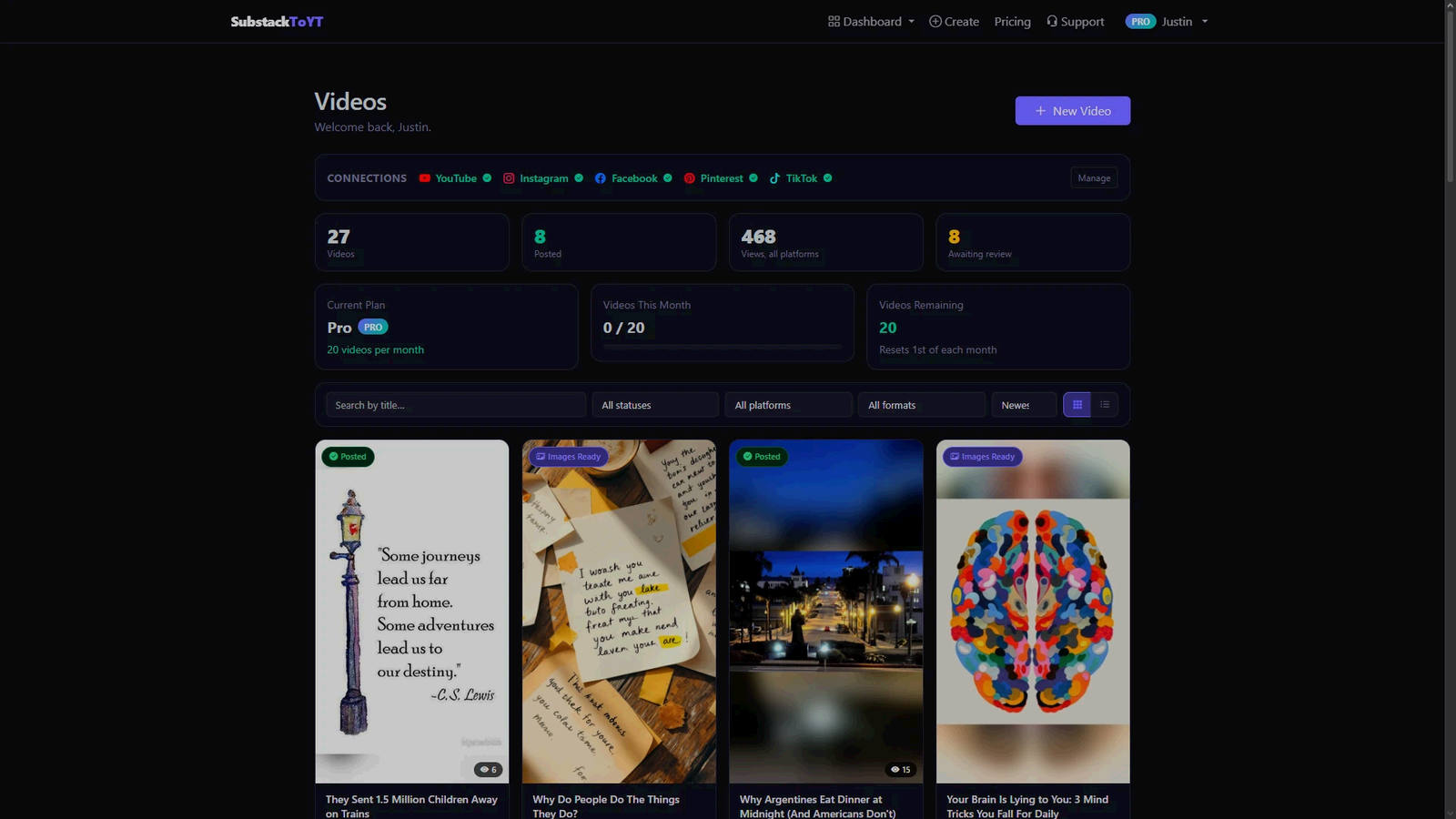
A dashboard of every video
Every video you've made in one place: watch it, download the MP4, and jump to each post on the platforms it reached.
Analytics for each platform
A hub for each connected platform with that platform's own numbers — views, likes, comments, saves or impressions, whichever it reports — kept up to date in the background.
A script and voiceover from your words
The script is written from your article, then narrated in a natural voice — six to choose from, with adjustable pace — and captioned on screen.
Original visuals, or your own
A newly generated image for every scene, with no stock photos — or feature the images already in your article. Vertical 9:16 video, with 16:9 long form on Pro.
Your dashboard
See what every video did, everywhere it went
Your videos, their status on each platform, and the numbers each platform reports — all in one place.
Demo
Watch it work
Pricing
Start free. Upgrade when you need more.
Every plan can post to YouTube, Instagram, Facebook, Pinterest and TikTok, schedule posts and see its analytics.
- 1 video per month — one attempt; every video you start counts
- Vertical 9:16 video
- Six narrator voices
- Original visuals, or your article's own images
- Post to several platforms at once
- Scheduling, dashboard and analytics
- 20 videos per month
- Everything in Free
- 16:9 long-form video as well as vertical
- Paste text instead of a link
- Four more visual styles, or describe your own
- Swap or describe any scene's image before it's built
- Music-only mode (no voiceover)
- Unposted videos kept until you delete them
Your video count resets on the 1st of each month. Payments are handled by Stripe. Pro has a 7-day money-back guarantee.
FAQ
Questions, answered honestly
Which platforms can it post to?
YouTube, Instagram, Facebook, Pinterest and TikTok. Connect whichever you use — any of them, or just one — and tick the ones you want each time you post.
YouTube videos go to your channel. Instagram videos are posted as Reels. Facebook videos go to a Page you manage, never your personal profile. Pinterest videos become pins on a board you choose. TikTok videos go to your account with the privacy and interaction settings you pick.
Do I need a Substack account?
No. You never sign in to Substack through us — you just paste the link to a public article and we read it from there. Pro accounts can also paste the article text directly.
You do need a Google account to sign in.
Is my account safe?
The tokens that let us post to your accounts are encrypted before they're stored, and every connection uses HTTPS. We only ask for the permissions posting and reading your videos' statistics need — never your messages or contacts — and we never post anything you haven't approved.
You can disconnect any platform from your Account page at any time, which deletes its token straight away. We never sell your data. The privacy policy lists exactly what we store.
What counts as one of my monthly videos?
Every video we start making counts, from the moment generation begins — that's when we start paying for the AI behind it. It still counts if you don't like the result, delete it, or something goes wrong while it's being made. Checking your link and reading the article is free: if we can't read it, or there isn't enough text, nothing is used. On Free that's one attempt a month, so check your link before you press Generate.
How long does a video take?
Usually a few minutes from pasting the link, depending on the article's length. You don't have to wait on the page — we email you when your video is ready to review.
Can I cancel Pro?
Yes, any time, from your Account page. Billing stops and your account moves to the Free plan straight away, and the videos you've made stay in your dashboard. See the refund policy for the 7-day money-back guarantee.
Who owns the videos?
You do. You keep the rights to your articles and to the videos made from them, and we add no watermark.
What happens to my data?
Video files are removed 30 days after they're posted (we keep the thumbnail and the links). Unposted videos are kept for 30 days on Free and until you delete them on Pro. You can delete any video yourself whenever you like.
To make the video, parts of your article go to the outside services that write the script, make the images and record the voice. They receive the article, never your name, email or phone number.
Delete my account, on the Account page, removes everything — your account, every video, every connection and token — and cancels any subscription. Details are in the privacy policy.
Your next post could be a video by tonight
Start with 1 free video a month. No credit card needed.